
miércoles, 25 de octubre de 2017

sábado, 8 de julio de 2017
respaldar conversaciones telegram - backup telegram conversations
Este plug-in para navegadores basados en chromium (chrome, opera, etc) https://chrome.google.com/webstore/detail/save-telegram-chat-histor/kgldnbjoeinkkgpphaaljlfhfdbndfjc/related
permite respaldar las conversaciones de telegram.

Nota: para instalarlo en Opera debe instalar previamente el plug-in
https://addons.opera.com/en/extensions/details/download-chrome-extension-9/ el cual permite instalar plug-ins para Chrome en Opera

Para guardar el historial de conversaciones de telegram necesitas :
- entrar a https://web.telegram.org, ingresar, and
- seleccionar uno de tus contactos.
Si ya lo hiciste y aun sigue apareciendo este mensaje recarga la pagina.
To save your telegram chat history, you first need to:
- visit https://web.telegram.org, login, and
- select one of your contacts.
If you did it already and still see this message, try to reload the web-page.
-------------------------------
Una vez abierta una conversación en telegram web debemos presionar el botón del plug-in

Después seleccionar la cantidad de mensajes que queremos respaldar, en este presionamos el boton All (todos)
Después presionamos el botón: "Save as text", lo que descargará automáticamente la conversación a nuestro computador.

Que estén muy bien!
=)
permite respaldar las conversaciones de telegram.

Nota: para instalarlo en Opera debe instalar previamente el plug-in
https://addons.opera.com/en/extensions/details/download-chrome-extension-9/ el cual permite instalar plug-ins para Chrome en Opera

Modo de empleo
Para guardar el historial de conversaciones de telegram necesitas :
- entrar a https://web.telegram.org, ingresar, and
- seleccionar uno de tus contactos.
Si ya lo hiciste y aun sigue apareciendo este mensaje recarga la pagina.
To save your telegram chat history, you first need to:
- visit https://web.telegram.org, login, and
- select one of your contacts.
If you did it already and still see this message, try to reload the web-page.
-------------------------------
Una vez abierta una conversación en telegram web debemos presionar el botón del plug-in

Después seleccionar la cantidad de mensajes que queremos respaldar, en este presionamos el boton All (todos)
Después presionamos el botón: "Save as text", lo que descargará automáticamente la conversación a nuestro computador.

Que estén muy bien!
=)
jueves, 26 de mayo de 2016
Could not load file or assembly 'EntityFramework, Version=6.0.0.0,
Install-package entityframework - version 6.1.3
EntityFramework error: The provider did not return a ProviderManifest instance
Download http://www.microsoft.com/en-us/download/details.aspx?id=40762 and update Nuget EF to 6.1.3 and everithing will work just fine.
miércoles, 25 de mayo de 2016
Miniweb un servidor http liviano y muy bueno
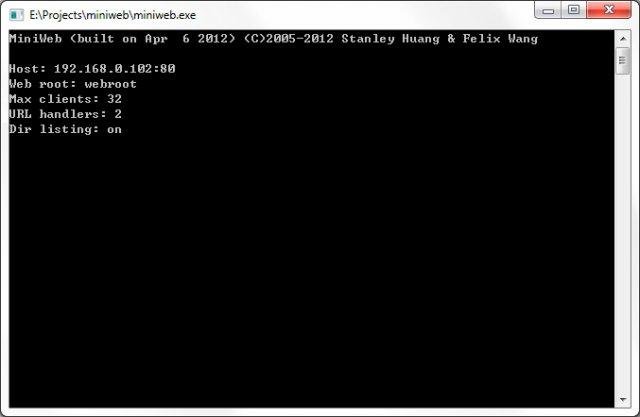

https://sourceforge.net/projects/miniweb/files/latest/download
https://sourceforge.net/projects/miniweb/files/latest/download
lunes, 18 de enero de 2016
field id masking
<script language=javascript>
//getting original ids
var idUser = "";
var idPass = "";
//generating mask ids
var d = new Date();
var mask = "_" + d.getFullYear() + (d.getMonth() + 1) + d.getDate() + "_" + d.getHours()
+ d.getMinutes() + d.getSeconds();
$(document).ready(function(){
//getting original ids
idUser = $('#txtUser')[0].id;
idPass = $('#txtPassword')[0].id;
//Adding Mask to Ids
$('#txtUser')[0].id = idUser + mask;
$('#txtPassword')[0].id = idPass + mask;
var idUserMasked= "#" + idUser + mask;
var idPassMasked= "#" + idPass + mask;
//deleting mask
//$(iduserMasked).attr("id", iduser);
//$(idPassMasked).attr("id", idPass);
//console.log("user id unmasked: " + $(txtUser).attr('id') );
//console.log("pass id unmasked: " + $(txtPassword).attr('id') );
});
</script>
//getting original ids
var idUser = "";
var idPass = "";
//generating mask ids
var d = new Date();
var mask = "_" + d.getFullYear() + (d.getMonth() + 1) + d.getDate() + "_" + d.getHours()
+ d.getMinutes() + d.getSeconds();
$(document).ready(function(){
//getting original ids
idUser = $('#txtUser')[0].id;
idPass = $('#txtPassword')[0].id;
//Adding Mask to Ids
$('#txtUser')[0].id = idUser + mask;
$('#txtPassword')[0].id = idPass + mask;
var idUserMasked= "#" + idUser + mask;
var idPassMasked= "#" + idPass + mask;
//deleting mask
//$(iduserMasked).attr("id", iduser);
//$(idPassMasked).attr("id", idPass);
//console.log("user id unmasked: " + $(txtUser).attr('id') );
//console.log("pass id unmasked: " + $(txtPassword).attr('id') );
});
</script>
miércoles, 17 de junio de 2015
initial password ultimatix
It is the initial password to login into https://www.ultimatix.net:
ChangePwd@date of bith (ddmmyyyy)
ChangePwd@date of bith (ddmmyyyy)
martes, 26 de mayo de 2015



Suscribirse a:
Entradas (Atom)